

Download OP AutoCliker – Free Auto Clicking Tool for Windows, Mac, Android & iOS
Looking for a reliable, secure, and lightweight auto clicking software? OP AutoCliker is a free utility tool developed by Mouse Tool that helps you automate repetitive mouse clicks across your devices. Whether you're a gamer, data entry professional, or software tester, this auto clicker app streamlines your workflow by simulating mouse clicks with precision.
With support for Windows, Mac, Android, and iOS, OP AutoCliker offers cross-platform functionality without requiring installation. You can set custom click intervals, define specific cursor coordinates, and even use hotkeys to start and stop automation instantly. Its intuitive interface makes it easy to configure, even for beginners.
Best of all, it’s completely free with no intrusive ads—ideal for users who value privacy and performance. From clicker games to repetitive testing tasks, OP AutoCliker delivers consistent results. Download it today and experience seamless automation.
Key Features of OP AutoCliker
OP AutoCliker stands out in the crowded market of automation tools thanks to its clean design and powerful functionality. One of its standout features is the ability to set a custom click interval in milliseconds, which is essential for games or tasks requiring rapid, precise automation. Whether you're aiming for 100 clicks per second or a slower 1 click every 2 seconds, the app gives you full control. You can also choose between left, right, or middle mouse button clicks, and select between single or double-click modes—perfect for different application needs.
Another powerful feature is the dynamic cursor location control. You can either let the app click where your cursor currently is when you start it, or manually enter specific X and Y coordinates for pinpoint accuracy. This is especially useful for testers who need to click on exact UI elements repeatedly. Additionally, the record and playback function allows you to capture a sequence of actions—like clicking, moving, and waiting—and replay them automatically. This makes it ideal for complex automation workflows beyond simple clicking.
The hotkey functionality is a game-changer. You can assign a keyboard shortcut to start and stop the automation process instantly, giving you full control without navigating through menus. This feature is particularly helpful during gameplay or long testing sessions. And because the software is portable, you can run it directly from a USB drive without installing anything. All these features are packed into a lightweight, secure, and ad-free application that respects your privacy and system performance.
How to Install and Use OP AutoCliker on Your Device
One of the biggest advantages of OP AutoCliker is its simplicity in installation and usage. Unlike many software tools that require complex setup, this app is completely portable—meaning you don’t need to install it. To get started, simply visit the official website, download the latest version (available for Windows, Mac, Android, and iOS), and extract the file if needed. On Windows and Mac, you can run the .exe or .dmg file directly. On Android and iOS, you’ll need to enable “Unknown Sources” or use a compatible app store to install the APK or IPA file.
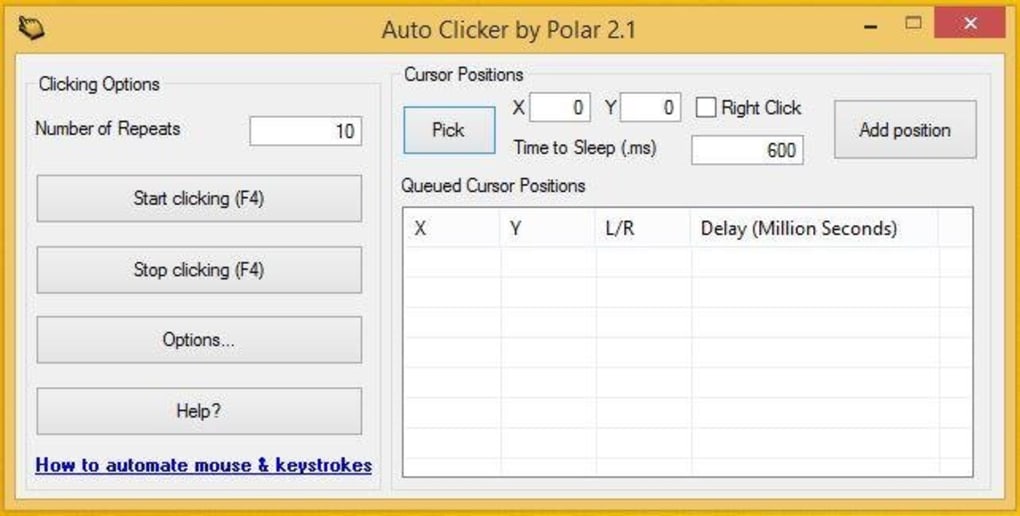
Once launched, the interface is clean and user-friendly. The main window displays all essential controls: click interval (in milliseconds), mouse button selection, click type (single/double), and cursor location options. To begin automation, first decide whether you want the app to click at your current cursor position or a specific coordinate.
If using custom coordinates, enter the X and Y values manually. Then, set your desired click frequency—such as 500ms for moderate speed or 10ms for rapid clicks. You can also define a total number of clicks or let it run indefinitely until stopped.
Next, assign a hotkey for starting and stopping the automation. This is done via the settings menu, where you can choose any key combination (e.g., Ctrl+Shift+X). After configuration, click “Start” or press your hotkey to begin.
The app will run silently in the background, performing clicks as scheduled. To stop, simply press the hotkey again or click “Stop” in the interface. For advanced users, the record and playback feature lets you capture complex sequences and replay them with perfect accuracy—ideal for repetitive testing or workflow automation.
Compatibility & System Requirements
OP AutoCliker is designed to work across multiple platforms, making it one of the most versatile auto clicking tools available. It supports Windows 7, 8, 10, and 11, ensuring compatibility with both older and modern systems. On Mac, it runs smoothly on macOS Mojave (10.14) and later versions, including macOS Sonoma. For mobile users, the app is available for Android 5.0 and above, as well as iOS 12 and newer. This cross-platform support means you can use the same automation logic whether you're on a desktop, laptop, tablet, or smartphone.
System requirements are minimal, which is a major plus for users with older or low-end devices. The app consumes very little RAM and CPU, so it won’t slow down your system during operation. It doesn’t require administrator privileges to run, and since it’s portable, you can carry it on a USB drive and use it on any machine without leaving traces. The lightweight nature of the software ensures fast startup times and consistent performance, even during long automation sessions.
Security is another strong point. The app is virus-free and does not collect user data. It doesn’t require internet access to function, so your privacy is preserved. Whether you’re using it for gaming, testing, or productivity, OP AutoCliker maintains a secure and stable environment. The developers regularly release updates to fix bugs and improve compatibility, so always check for the latest version to ensure optimal performance.
Pros and Cons of OP AutoCliker
- Pros:
- Completely free with no ads or in-app purchases
- Lightweight and fast, with minimal system resource usage
- Portable—no installation required
- Supports multiple platforms: Windows, Mac, Android, iOS
- Customizable click intervals, button selection, and click types
- Hotkey support for instant start/stop control
- Record and playback feature for advanced automation
- Secure, privacy-focused, and virus-free
- Cons:
- Limited interface design—basic but functional
- No built-in scripting or advanced automation logic
- Mobile version may require sideloading (Android/iOS)
- Not ideal for complex multi-step automation workflows
- No cloud sync or backup for configurations
Frequently Asked Questions (FAQ)
- Is OP AutoCliker safe to download and use?
Yes, OP AutoCliker is completely safe. It’s a portable app that doesn’t require installation, doesn’t collect personal data, and is virus-free. Always download from the official website to avoid third-party modifications.
- Can I use OP AutoCliker for online games?
While the tool can automate clicks, using it for unfair advantage in online games may violate the game’s terms of service. Use it responsibly and ethically—only for single-player games or testing purposes.
- Does OP AutoCliker work on Mac and mobile devices?
Yes, OP AutoCliker is compatible with macOS (10.14 and later) and supports Android 5.0+ and iOS 12+. Download the appropriate version for your device.
- How do I stop the auto clicking?
You can stop the automation by pressing the assigned hotkey or clicking the “Stop” button in the app interface. The hotkey feature is highly recommended for quick control.
- Can I set a specific number of clicks?
Yes, you can set a fixed number of clicks. Just enter the desired count in the configuration panel, and the app will stop automatically after reaching that number.
- Is there a way to record and replay mouse actions?
Yes, OP AutoCliker includes a record and playback function that captures mouse movements, clicks, and delays, allowing you to replay the sequence automatically.
Conclusion: Is OP AutoCliker Worth Downloading?
If you're looking for a free, secure, and efficient auto clicking tool, OP AutoCliker is an excellent choice. Its lightweight design, cross-platform support, and lack of ads make it stand out among similar software. Whether you're a gamer playing clicker games, a tester automating UI checks, or a professional handling repetitive tasks, this app delivers reliable performance without slowing down your system.
While it lacks advanced scripting features, its core functionality is rock-solid. The hotkey control, customizable intervals, and record/playback options make it highly practical for everyday use. And with regular updates and strong privacy practices, you can trust it to work safely across your devices.
Download OP AutoCliker today and simplify your workflow with intelligent automation—no installation, no hassle, just results.







